 NEW9
NEW9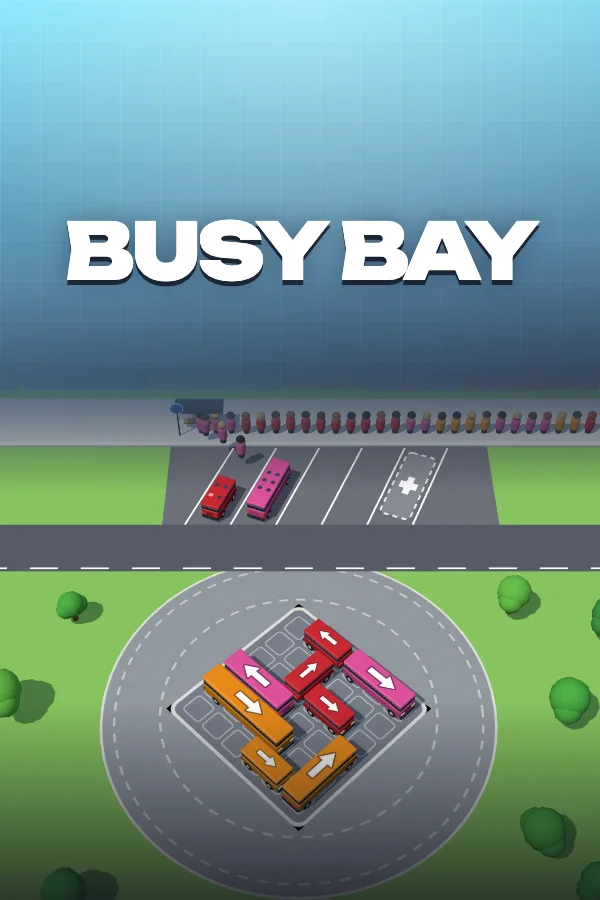
Busy Bay
 by ZotaGame
0 likes5 plays
One tap sends a bus nose-first out of a jammed lot. Match its colour to the riders at the stop and clear 30 lots before the bays clog up.
What is Busy Bay?
Busy Bay is a 3D bus-jam puzzle game where you tap buses out of a packed parking lot so a long line of colour-coded riders can get a seat. Every bus rolls the way its roof arrow points and grabs a free bay at the stop, where riders hop only onto their own colour: a mini seats 4, a van 6 and a city bus 10. Lots grow from 4 buses in level 1 to 31 buses and 164 riders in level 30, so every tap is a small bet on who in the line needs a ride next.
Updated
How to play Busy Bay
Goal: Get every rider in the line onto a bus of their colour before the bays at the stop fill with buses nobody at the front can use.
- Spot a bus with open road ahead of its white roof arrow: only those can drive out of the lot.
- Tap or click it, and the bus loops round the plaza into the first empty bay at the stop.
- Watch the line move: the front rider climbs into the earliest-parked bus of the same colour, and a full bus drives off and frees its bay.
- Boxed-in bus? A tap just makes it nudge forward and roll back, so clear whatever stands in front of its arrow first.
- From level 4, press Repaint, Line Up or Extra Bay (keys 1, 2, 3) when a lot turns against you; each one works once per level.
Controls
| Key | Action |
|---|---|
| Tap / click a bus | Send that bus towards the stop |
| Arrow keys / WASD | Move the selection to the nearest bus |
| SpaceEnter | Send the selected bus |
| 123 | Repaint, Line Up, Extra Bay |
| R | Restart the level |
| EscP | Pause |
Tips & tricks
- Read the colours at the head of the line before every tap: a bus that nobody near the front wants just parks and eats a bay.
- Once the Last free bay! warning pops up, the next bus you send must match the rider at the front, or the level ends right there.
- A 4-seat mini fills and leaves far sooner than a 10-seat city bus, so park big buses only when a long run of their colour is waiting.
- Bumps cost nothing, so tap a buried bus once to see which neighbour blocks it, then free that neighbour first.
- From level 12, free the bus in front of a grey tarp early: the tarp lifts as soon as its road is clear, and you learn its colour while bays are still empty.
- Chasing 3 stars? Finish without any helper. One helper leaves you 2 stars, and two or three leave you 1.
Frequently asked questions
Which buses can leave the lot in Busy Bay?
Only a bus whose road is empty all the way from its nose to the edge of the lot, in the direction of its white roof arrow. Any bus or planter in that line blocks it. Tapping a blocked bus makes it bump and roll back to its spot, with no penalty except a higher bump count on the result screen.
What does Repaint actually change in Busy Bay?
Repaint swaps colours between buses of the same size that are still in the lot. Buses with the clearest road get the colours the line needs soonest, and the total seats of each colour never change. If no swap would help, a message says so and the helper is not used up.
How does Line Up reorder the riders in Busy Bay?
Line Up looks at the next 16 riders in the line. Anyone among them who fits a bus already parked at the stop moves to the front, in their original order, and boards straight away. If nobody in those 16 fits a parked bus, the game tells you and you keep the helper.
Can you keep playing after the stop fills up in Busy Bay?
Yes, once per level from level 4. When the Out of bays! card appears and you have not used Extra Bay yet, its button opens one more bay at the end of the row and the level carries on. That still counts as a helper, so it lowers the stars for that clear.
How big do the parking lots get in Busy Bay?
Level 1 starts with 4 buses and 24 riders. By level 30 the lot holds 31 buses for 164 riders, with planters in the way, buses under grey tarps and 5 bays at the stop instead of the usual 4. The 30 levels are split into Sunny Depot, Harbor Stop and Night Line.
Why won't a rider get on the bus right next to them in Busy Bay?
Riders only board a bus of their own colour, and only the rider at the front of the line moves. If two buses of the same colour are parked, the one that arrived first fills up before the other. So a waiting bus can sit empty until its colour reaches the head of the line.
Is there a timer or an undo button in Busy Bay?
Neither. There is no clock, so you can study the lot as long as you like before each tap, but every bus you send is final. If a level goes wrong, press R or the restart button to start the same lot again from the beginning.